Modern vehicles have moved far beyond traditional keys, and Ford Motor Company has been at the forefront of this shift. Key fobs have become a standard feature, offering remote locking, unlocking, and even push-button start functionality. These small devices play a big role in daily convenience, making access to your vehicle quick and effortless.
Inside every key fob is a small battery that powers all these functions. Over time, this battery weakens, leading to reduced range or complete failure. Many drivers overlook this until the key fob stops working at the worst possible moment. Replacing the battery is simple, affordable, and can be done at home with minimal tools.
Knowing how the system works, which battery type is required, and the correct replacement process can save time and avoid unnecessary dealership visits. With proper care and timely replacement, a key fob can continue to perform reliably for years.
How Ford Key Fob Battery Works
Role Of Battery In Remote Functionality
A key fob operates using a small coin-cell battery that sends radio signals to your vehicle. When you press a button, the battery provides power to the internal circuit, which transmits a coded signal. The car receives this signal and performs the requested action, such as locking or unlocking the doors.
In vehicles equipped with push-button start, the key fob also communicates with sensors inside the car. This allows the engine to start without inserting a key. The battery ensures that this communication remains consistent and reliable.
As the battery weakens, the signal strength decreases. This may result in shorter operating range or delayed response. In some cases, you may need to press the button multiple times before the car responds. These are early signs that the battery needs replacement.
Maintaining a healthy battery ensures that all remote functions work smoothly, reducing inconvenience and avoiding unexpected failures.
Types Of Batteries Used In Ford Key Fobs
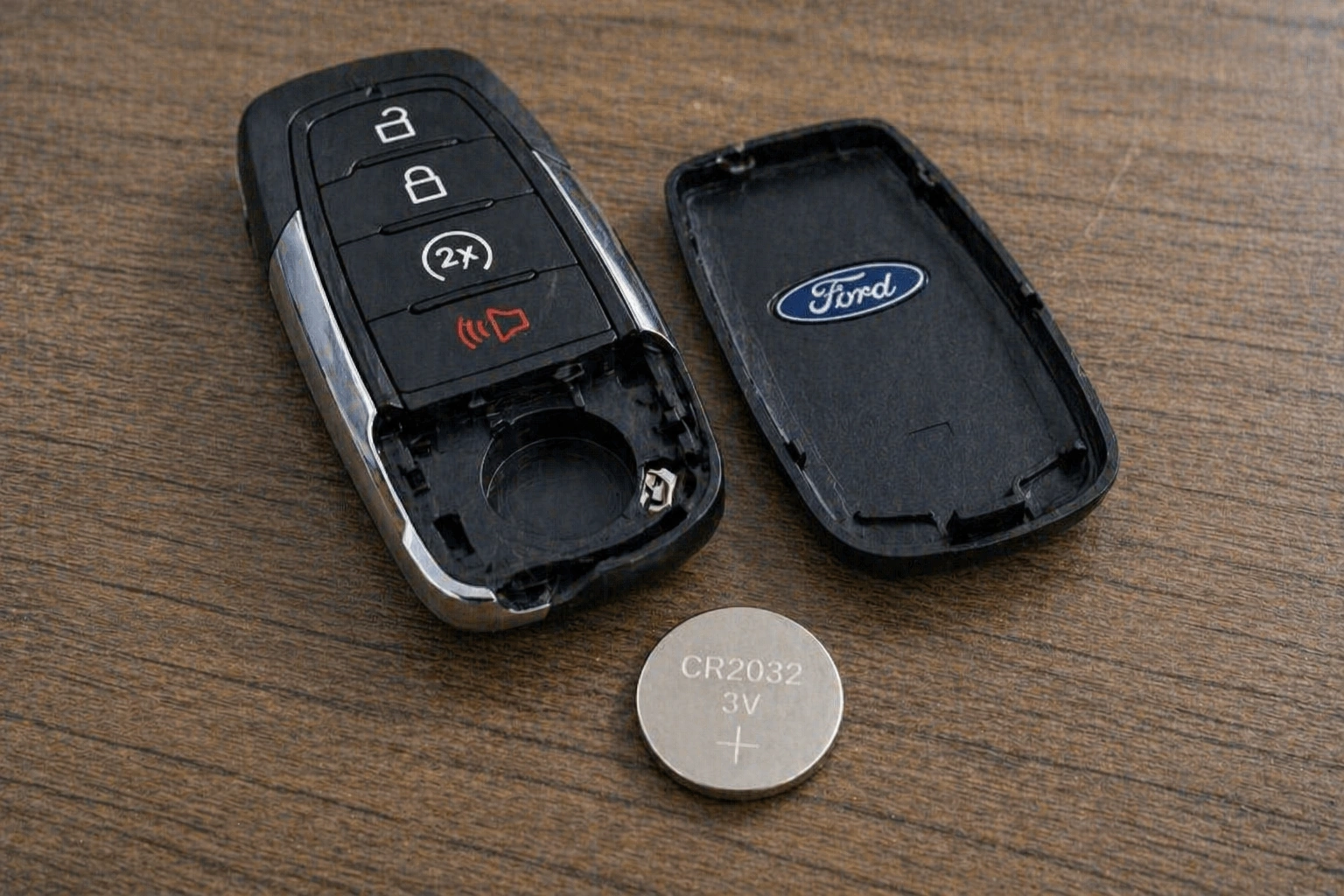
Most Ford Motor Company key fobs use lithium coin-cell batteries such as CR2032 or CR2025. These batteries are compact, widely available, and designed to provide stable power over a long period.
The exact battery type depends on the model and year of the vehicle. Some older key fobs may use different sizes, while newer smart keys typically use CR2032 due to its higher capacity. Checking the existing battery or referring to the owner’s manual helps in selecting the correct type.
Using the right battery is important for proper functioning. A mismatched battery may fit physically but fail to deliver the required voltage, leading to inconsistent performance.
High-quality batteries from trusted brands tend to last longer and provide more reliable operation. Investing in a good battery reduces the frequency of replacements and ensures consistent performance.
Average Lifespan Of Key Fob Battery
A key fob battery typically lasts between two to four years, depending on usage. Frequent use, such as multiple lock and unlock actions daily, can shorten its lifespan. Environmental factors like extreme temperatures also affect battery performance.
Cold weather can reduce battery efficiency, making the key fob less responsive. On the other hand, high temperatures can accelerate battery degradation over time. Keeping the key fob in a moderate environment helps maintain its lifespan.
Some vehicles display a warning message when the key fob battery is low. This provides an early indication, allowing you to replace the battery before it completely fails.
Regular replacement as part of routine maintenance ensures uninterrupted functionality and prevents inconvenience during critical moments.
Signs Your Ford Key Fob Battery Is Low
Reduced Range And Delayed Response
One of the first signs of a weak battery is reduced operating range. You may notice that the key fob only works when you are very close to the vehicle. This happens because the battery can no longer provide enough power for a strong signal.
Delayed response is another common symptom. Pressing the button may not produce an immediate reaction, requiring multiple attempts. This can be frustrating, especially in situations where quick access is needed.
These early signs should not be ignored. Replacing the battery at this stage is simple and prevents further inconvenience. Waiting too long can lead to complete failure, leaving you unable to use remote functions.
Monitoring these changes helps in identifying battery issues early and maintaining smooth operation.
Warning Messages And Dashboard Alerts
Many modern Ford Motor Company vehicles are equipped with systems that detect low key fob battery levels. When the battery starts to weaken, a warning message may appear on the dashboard.
This alert serves as a reminder to replace the battery soon. Ignoring it can result in the key fob becoming unresponsive at an inconvenient time. Some vehicles may still allow you to start the engine by placing the key fob near a designated sensor, but this is only a temporary solution.
Dashboard alerts provide a clear and reliable indication of battery condition. Responding promptly ensures that the key fob continues to function without interruption.
Keeping an eye on these notifications helps maintain convenience and avoids unexpected issues.
Complete Failure Of Key Fob Functions
When the battery is fully depleted, the key fob stops working entirely. Buttons will not respond, and the vehicle will not receive any signals. This can make it difficult to lock, unlock, or start the car.
In such cases, you may need to use the physical key hidden inside the fob. This allows manual access to the vehicle but does not provide the convenience of remote functions.
Complete failure often occurs without much warning if earlier signs are ignored. Replacing the battery at the first indication of weakness prevents this situation.
Being prepared with a spare battery can also help in emergencies, ensuring that you are never stranded without access to your vehicle.
Step By Step Guide To Replace Ford Key Fob Battery
Opening The Key Fob Safely
Replacing the battery begins with opening the key fob carefully. Most Ford key fobs have a small slot or seam where the two halves of the casing meet. Using a flat tool such as a small screwdriver, gently pry the case open.
It is important to apply even pressure and avoid forcing the case apart. Excessive force can damage the plastic housing or internal components. Working slowly ensures that the key fob remains intact.
Some models include a release button for the physical key. Removing this key may reveal the opening slot, making it easier to separate the casing.
Taking care during this step prevents unnecessary damage and ensures that the key fob can be reassembled properly after replacing the battery.
Replacing The Old Battery With New One
Once the key fob is open, locate the battery inside. It is usually held in place by small clips. Carefully remove the old battery, noting its orientation. The positive side should be facing the same direction when inserting the new battery.
Insert the new battery securely, ensuring it fits properly within the holder. Avoid touching the battery surface excessively, as oils from your fingers can affect performance.
Using the correct battery type is essential. Refer to the markings on the old battery or the owner’s manual to confirm compatibility.
Proper installation ensures that the key fob functions correctly and provides reliable performance.
Reassembling And Testing The Key Fob
After replacing the battery, align the two halves of the key fob and press them together until they snap into place. Ensure that all edges are securely closed to protect the internal components.
Test the key fob by pressing the buttons and checking the response from the vehicle. Verify that all functions, including locking, unlocking, and remote start, are working as expected.
If the key fob does not respond, reopen it and check the battery placement. Ensuring correct orientation and proper contact usually resolves the issue.
Testing confirms that the replacement was successful and that the key fob is ready for regular use.
Tips To Extend Key Fob Battery Life
Avoiding Unnecessary Usage And Signal Interference
Frequent use of the key fob can drain the battery faster. Pressing buttons repeatedly, especially when not needed, reduces battery life over time. Limiting usage to essential functions helps conserve power.
Signal interference from electronic devices can also affect performance. Keeping the key fob away from strong electromagnetic sources reduces unnecessary battery drain.
Using the key fob efficiently ensures longer battery life and consistent performance. Small changes in usage habits can make a noticeable difference.
Being mindful of how and when the key fob is used helps maintain its reliability over time.
Protecting Key Fob From Environmental Damage
Exposure to extreme temperatures can impact battery performance. Keeping the key fob in a moderate environment helps maintain its efficiency. Avoid leaving it in direct sunlight or extremely cold conditions.
Moisture and dust can also affect internal components. Using a protective cover can shield the key fob from environmental damage and extend its lifespan.
Dropping the key fob can loosen internal connections, affecting battery contact. Handling it carefully prevents such issues and ensures consistent operation.
Taking simple precautions helps preserve both the battery and the key fob itself.
Regular Maintenance And Backup Planning
Replacing the battery at regular intervals prevents unexpected failure. Even if the key fob is still working, changing the battery every few years ensures reliability.
Keeping a spare battery in your vehicle or at home provides a quick solution in case of sudden failure. This is especially useful during long trips or emergencies.
Periodic inspection of the key fob ensures that it remains in good condition. Checking for signs of wear or damage helps address issues early.
A proactive approach to maintenance keeps the key fob functioning smoothly and reduces the risk of inconvenience.
Final Thoughts
A key fob may seem like a small accessory, but it plays a vital role in modern vehicle convenience. Keeping its battery in good condition ensures smooth operation and avoids unexpected issues.
Replacing the battery is a simple process that can be done quickly with minimal effort. Knowing the correct steps and using the right battery type ensures reliable performance.
Regular care, proper usage, and timely replacement help extend battery life and maintain functionality. Staying prepared with a spare battery adds an extra layer of convenience.
With consistent attention, a Ford key fob continues to provide seamless access and control, making everyday use more efficient and hassle-free.